Somebody seems to have been fiddling with our laser cutter!
Previously we used to download the file to the laser cutter, move the laser head to our desired start point and press start - no problems.
Now however, we download the file, move the head, press start and it moves to the machine datum point (top right corner) and starts to cut from there.
For some jobs this isn't particularly an issue, just move the work, but for other such as openings in the middle of the material it is.
Does anybody know what happened and how we can put it back the way it was please?
May thanks.
How to put our datum back?
How to put our datum back?
Ian Teasdale
Whitley Bay High School
Using a LS 6090
Whitley Bay High School
Using a LS 6090
Re: How to put our datum back?
What software?
And hello from sunny (south) shields
And hello from sunny (south) shields
http://www.tmbelectronics.com - Electronics, tools, hobby tools, power tools, and much more!
An ex LS3020 user now playing with an LS6840PRO (60W) and an LS1290PRO (80W)
An ex LS3020 user now playing with an LS6840PRO (60W) and an LS1290PRO (80W)
Re: How to put our datum back?
Sorry about that, the software we are using is Lasercut 5.3 (actually called Laser system 5.3 in Help... About...)
Many thanks
Many thanks
Ian Teasdale
Whitley Bay High School
Using a LS 6090
Whitley Bay High School
Using a LS 6090
-
Pedro_Hernandez
- Posts: 184
- Joined: Thu Dec 09, 2010 8:54 pm
- Location: Hertfordshire
- Contact:
Re: How to put our datum back?
Had the same thing happen to the 1290 at our School, someone unchecked a few boxes !.
Try ticking the immediate checkbox in the engrave panel.
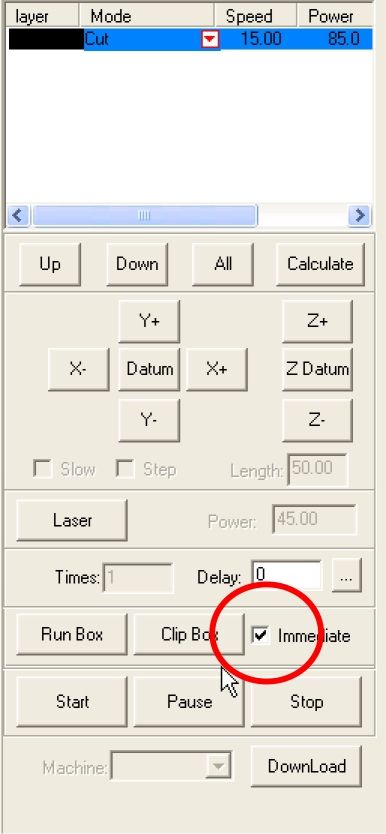
Pedro
Try ticking the immediate checkbox in the engrave panel.
Pedro
HPC1290 User HPC 3020 Owner
-
SimonMallas
- Posts: 54
- Joined: Sat Jan 21, 2012 9:23 am
- Contact:
Re: How to put our datum back?
Hi,
You call also try pressing the return button on the key pad, to highlight the file then press it again to open another dialoge window. Navigate to "cancell logic org" YES. This should turn off the set datum.
Cheers Simon
You call also try pressing the return button on the key pad, to highlight the file then press it again to open another dialoge window. Navigate to "cancell logic org" YES. This should turn off the set datum.
Cheers Simon
Who is online
Users browsing this forum: No registered users and 7 guests