Hi
I have an LS6480 and would like to get into photo engraving. I have attached my first attempt which is not good. Can anyone suggest any tutorials for me to watch. My attempt has complete lines engraved making a very poor image. I am obviously doing something completely wrong.
Dave
Newbie on photo engraving
Re: Newbie on photo engraving
Tried to upload an image but seem board is full or something.
Dave
Dave
-
ncamacho2000
- Posts: 55
- Joined: Tue Dec 13, 2011 11:00 pm
- Contact:
Re: Newbie on photo engraving
Not sure what programs you are using, but i would recomend photograv as its loads easier and quicker than photoshop and better than results in caorel draw.
-
TimBobTastic
- Posts: 152
- Joined: Sun Jan 18, 2015 6:38 pm
- Contact:
Re: Newbie on photo engraving
there are lots of paid software titles, (I use photoshop now) but, I used to get perfectly decent photo engraving results using Gimp... there are some great tutorials on YouTube...
Only additional advice is... make sure your scan gap matches your DPI, for example a 300 DPI image should use a scan gap of 0.08466mm
Simple equation... Scan Gap = DPI / 25.4
There is a forum topic somewhere that lists scan gap for common DPI's
Image prepared with Gimp

Image prepared with Photoshop
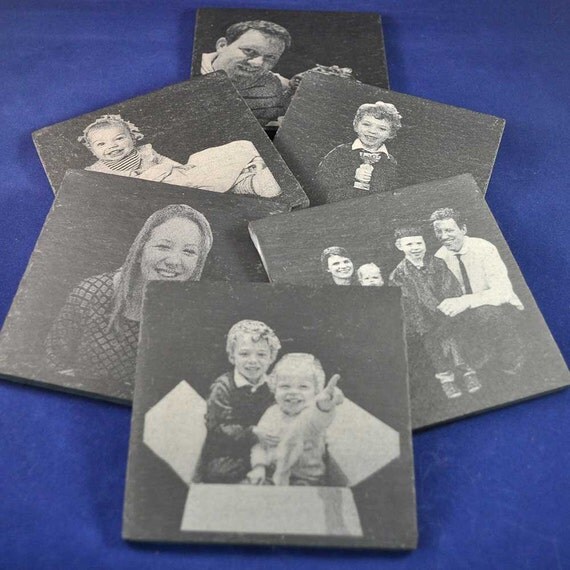
Good Luck
Only additional advice is... make sure your scan gap matches your DPI, for example a 300 DPI image should use a scan gap of 0.08466mm
Simple equation... Scan Gap = DPI / 25.4
There is a forum topic somewhere that lists scan gap for common DPI's
Image prepared with Gimp
Image prepared with Photoshop
Good Luck
LS3060 PLUS with a 60w tube, Chiller and Bofa filter 
Online Store http://www.t2kreations.co.uk
Personal Website... http://www.timbobtastic.com
Online Store http://www.t2kreations.co.uk
Personal Website... http://www.timbobtastic.com
Re: Newbie on photo engraving
@TimBobTastic
Hi there
Can I ask a quick question (btw excellent photos and so crisp/clear!!) - When you engrave on acrylic do you
1) Engrave with the plastic protection in place, and then remove it (both top and bottom after)?
2) Remove the plastic protection on the side you will engrave before engraving
3) Remove the plastic protection on the side you will engrave and put a layer of adhesive paper over
Thanks!
PS Love the lightbox .. I just made one with 12v strip leds - worked well, but not bright enough for tall images
Hi there
Can I ask a quick question (btw excellent photos and so crisp/clear!!) - When you engrave on acrylic do you
1) Engrave with the plastic protection in place, and then remove it (both top and bottom after)?
2) Remove the plastic protection on the side you will engrave before engraving
3) Remove the plastic protection on the side you will engrave and put a layer of adhesive paper over
Thanks!
PS Love the lightbox .. I just made one with 12v strip leds - worked well, but not bright enough for tall images
-
TimBobTastic
- Posts: 152
- Joined: Sun Jan 18, 2015 6:38 pm
- Contact:
Re: Newbie on photo engraving
Can I ask a quick question (btw excellent photos and so crisp/clear!!) - When you engrave on acrylic do you...
I remove protection on the engraved side only, and engrave & cut in a single process
The light box is self contained 12V, powered by batteries. I get reasonable light penetration for images up to 200mm tall, and have made edge lit photo / clock combinations as gifts and awards for industrial customers without complaint.
LS3060 PLUS with a 60w tube, Chiller and Bofa filter
Online Store http://www.t2kreations.co.uk
Personal Website... http://www.timbobtastic.com
Online Store http://www.t2kreations.co.uk
Personal Website... http://www.timbobtastic.com
Re: Newbie on photo engraving
Awesome - Thanks for the advice! Im still struggling to get clear images ... but will keep perservering

Re: Newbie on photo engraving
looking good, but don't forget that's a negative
-
TimBobTastic
- Posts: 152
- Joined: Sun Jan 18, 2015 6:38 pm
- Contact:
Re: Newbie on photo engraving
thats a great image... as Lightnin said... dont forget to invert the image colours on the Photo...black to white white to black... there is a menu item in Laser script for that...
LS3060 PLUS with a 60w tube, Chiller and Bofa filter
Online Store http://www.t2kreations.co.uk
Personal Website... http://www.timbobtastic.com
Online Store http://www.t2kreations.co.uk
Personal Website... http://www.timbobtastic.com
Re: Newbie on photo engraving
OMG .. I feel like such an rrrrrs Did not see that !
Thanks guys :doh: :facepalm: Will try again this weekend!
Did not see that !Thanks guys :doh: :facepalm: Will try again this weekend!
Who is online
Users browsing this forum: No registered users and 9 guests